Named workstreams
Named workstreams isolate certain work within a dedicated BullMQ Queue. Not only does this enable control over resource allocation to certain work, but it organizes visualization when using a dashboard such as the Taskforce BullMQ dashboard or the open source Bull Board (available for Koa, Express, and other frameworks):
Bull Board provides monitoring dashboards for BullMQ. For Psychic 3.0 (Koa-based), use @bull-board/koa. If you're using Psychic 2.0 (Express-based), use @bull-board/express.
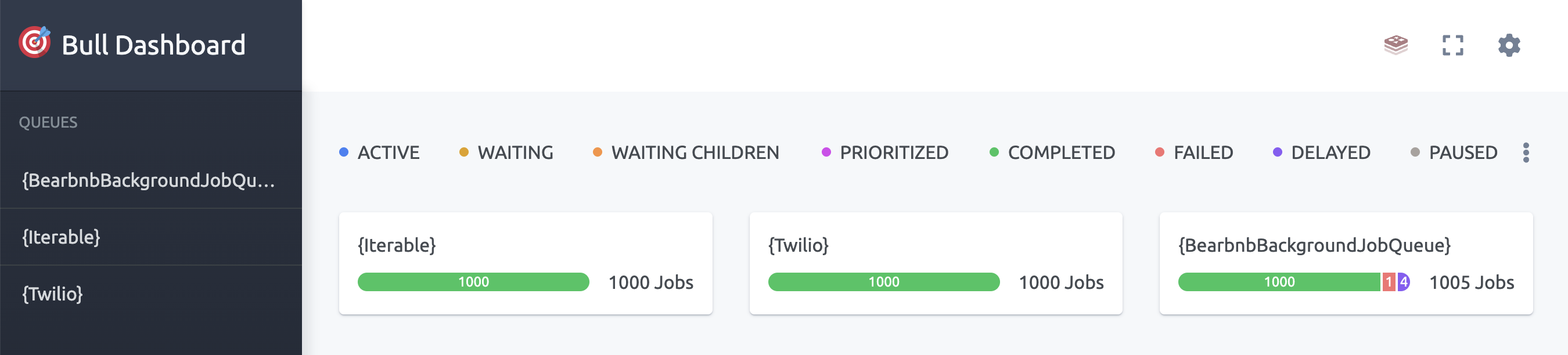
Configure named workstreams in conf/initializers/workers.ts by adding a namedWorkstreams key:
  workersApp.set('background', {
    ...

    namedWorkstreams: [
      {
        name: 'Iterable',
        // https://docs.bullmq.io/guide/parallelism-and-concurrency
        workerCount: 1,
        concurrency: 10,
      },
      {
        name: 'Twilio',
        // https://docs.bullmq.io/guide/parallelism-and-concurrency
        workerCount: 1,
        concurrency: 10,
      },
    ],
  })

  ...
})
Then set the workstream used by the class:
class IntercomSync extends ApplicationBackgroundedService {
  public static get backgroundJobConfig(): BackgroundJobConfig<ApplicationBackgroundedService> {
    return { workstream: 'Iterable' }
  }
}
Isolation and priority hold together
A workstream's name also becomes the group.id on that workstream's jobs and workers — a BullMQ Pro surface that open-source BullMQ stores and ignores. The job's priority is unaffected: Psychic writes the mapped priority number to BullMQ's top-level priority on every job, grouped or not, so a service on a named workstream keeps its priority ordering. See Priority for the full detail.
Per-workstream connections
A named workstream can carry its own queueConnection and workerConnection:
namedWorkstreams: [
  {
    name: 'Intercom',
    workerCount: 1,
    queueConnection: intercomRedis,
    workerConnection: intercomWorkerRedis,
  },
],
Without them, the workstream shares the app-wide default connection, and the isolation it provides is limited to queue and worker counts — not a separate Redis instance.
Retiring a named workstream
Dropping a namedWorkstreams entry and running pnpm psy sync regenerates workstreamNames, so every service still routing to that workstream becomes a TypeScript error. What the compiler cannot reach is whatever is already queued, and each route leaves it somewhere different:
- Registration and class removed together. With no entry, Psychic builds neither the queue nor its workers. A delayed job is only ever promoted by a worker attached to that queue — the keys are per queue, so no other workstream's workers can drain it — and nothing in Psychic reports a queue it no longer builds. Whatever was waiting silently never runs. This is right only when the queue's remaining contents are disposable.
- Class removed, registration kept. The workers stay attached and keep pulling, so the remaining work surfaces in BullMQ's
failedset (see Process-level error semantics) — countable, and attributable to the name you just deleted. - Entry moved to
transitionalWorkstreams. Queue and workers are still built under the same name, so the backlog keeps draining, while the name is gone fromworkstreamNamesand every typed enqueue site is a compile error.
A workstream carrying scheduled work never drains. Working an occurrence is what mints the next one, so watching that queue go quiet proves nothing. The scheduler entry has to be removed with ApplicationScheduledService.unschedule(...), which sweeps every queue the app builds, transitional ones included — but it cannot reach a queue that is no longer built, so unschedule while the namedWorkstreams entry still exists, or while it sits in transitionalWorkstreams. See scheduled jobs.